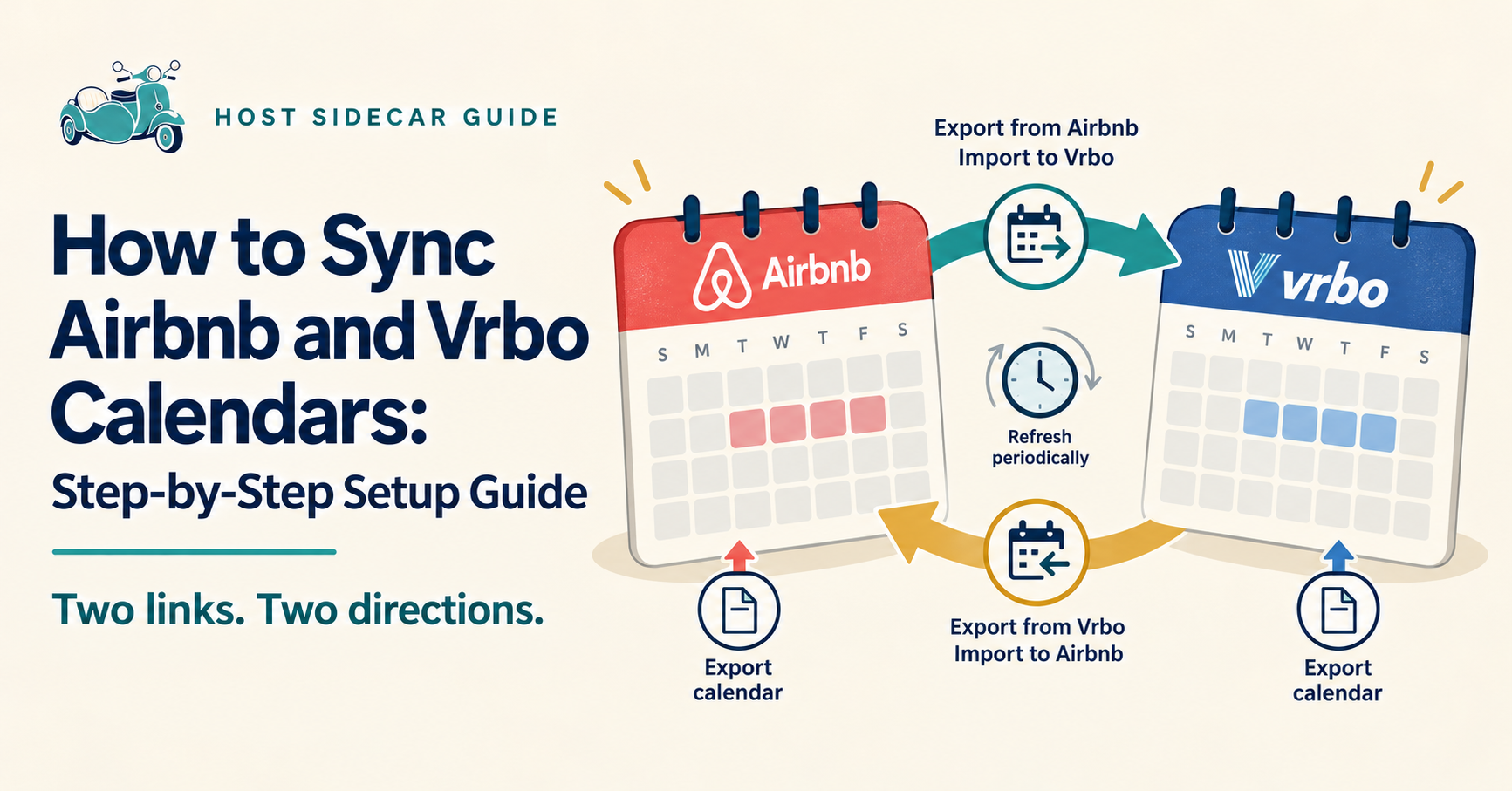
To synchronize Airbnb and Vrbo calendars, export your Airbnb calendar link and import it into Vrbo. Then export your Vrbo calendar link and import it into Airbnb. Both connections are needed to share booked dates in both directions.
This guide shows co-hosts and vacation rental managers how to make those connections, check that they work, and troubleshoot missing or unexpected calendar blocks.
The goal is straightforward: keep available nights bookable, reduce manual calendar updates, and maintain control over your property’s availability.
Before you begin
Have both listings open on a desktop computer and confirm they represent the same rental unit. You will need access to each listing’s calendar settings.
These instructions use iCal calendar links. If your property already uses a PMS or channel manager, check its connection instructions first. Vrbo’s calendar-import feature is unavailable for properties managed through third-party property management software. Vrbo calendar-import guidance.
Step 1: Export your Airbnb calendar
- In Airbnb, open Calendar and select the property.
- Select Availability.
- Under Connect calendars, choose Connect to another website.
- Copy the Airbnb calendar export link.
Keep this link ready for Vrbo. Airbnb calendar-sync instructions.
Step 2: Import the Airbnb calendar into Vrbo
- Open the matching property in your Vrbo Owner Dashboard.
- Select Calendar.
- Open Settings → Availability.
- Under Calendar sync, select Connect calendars.
- Choose Manage imported calendars → Import a calendar.
- Paste the Airbnb link into Calendar URL.
- Select Next, name it “Airbnb,” and select Import.
Use the calendar feed link, rather than your public listing address. Vrbo says newly imported events may take up to 20 minutes to appear. Vrbo import instructions.
Step 3: Export your Vrbo calendar
- In the same Vrbo listing, open Calendar → Settings → Availability.
- Under Calendar sync, choose Connect calendars → Export calendar.
- Leave Include tentative bookings unchecked when exporting to Airbnb.
- Select Copy URL.
Vrbo recommends including tentative bookings only when exporting to a private calendar, rather than another booking website. Vrbo export instructions.
Step 4: Import the Vrbo calendar into Airbnb
- Return to Airbnb’s Calendar → Availability → Connect calendars → Connect to another website.
- Paste the Vrbo calendar link into the calendar address field.
- Name it “Vrbo” and select Add calendar.
You have now connected both directions. Menu labels may change as the platforms update their interfaces. Airbnb calendar-sync instructions.
Step 5: Check that both connections work
Do not stop at seeing “calendar added.” Confirm the resulting availability.
Use this verification checklist:
- Compare an existing Airbnb reservation with the same dates on Vrbo.
- Compare an existing Vrbo reservation with the same dates on Airbnb.
- Check owner stays and manually blocked dates separately.
- Review arrival and departure dates carefully.
- Confirm that genuinely available nights remain open.
- Recheck both calendars after a reservation changes or is canceled.
If you lack a reservation in one direction, mark that check as pending and verify it when a real booking arrives.
How long does Airbnb and Vrbo calendar sync take?
iCal calendar sync is periodic, rather than immediate. Airbnb states that imported calendars refresh automatically every three hours and provides a manual refresh option. Vrbo’s Owner app instructions state that calendars sync every 30 minutes. These intervals leave time when the other platform may still show outdated availability. Airbnb refresh guidance, Vrbo sync guidance.
After a new booking or date change, verify the affected nights on the other platform. If they remain open, block them there while investigating.
Why are my Airbnb and Vrbo calendars not syncing?
Start with these checks:
Only one direction is connected. Confirm Airbnb is imported into Vrbo and Vrbo is imported into Airbnb.
The wrong link or property was selected. Compare the property names and confirm each imported link came from the matching listing’s calendar export.
The receiving calendar has not refreshed. Check its latest update and use the available refresh control.
The calendar connection is working, but another rule is blocking dates. Inspect the reason for the block before reopening nights. Airbnb availability settings—including preparation time, advance notice, and stay restrictions—can affect bookability. Airbnb guidance on blocked nights.
A manual block did not transfer as expected. Check owner stays and maintenance blocks on both platforms. Airbnb notes that some blocks from external calendars may not carry over. Airbnb calendar-sync guidance.
Frequently asked questions
Can I sync Airbnb and Vrbo calendars without a PMS?
Yes. The two-way iCal setup above lets you exchange calendar information without adding a PMS, provided calendar import is available for your accounts.
Does calendar sync prevent every double booking?
No. Periodic refreshes leave a window in which two guests could book overlapping dates. Checking availability after booking changes remains important.
Does iCal sync Airbnb and Vrbo prices?
Treat iCal as a calendar connection. Do not assume it has aligned your rates, fees, discounts, or minimum-stay strategy. Review those settings separately.
When should a co-host use a PMS or channel manager?
Consider one when multiple properties, channels, and reservation changes make manual checks difficult to sustain.
With a connected PMS, listings must be mapped to the same physical property and the appropriate sync settings enabled. For example, Hospitable requires matching channel listings to be merged for reservation sync to work across them. Hospitable reservation-sync guidance.
Make calendar sync part of a repeatable operating routine
For co-hosts building their business, the useful habit is consistent: connect both directions, verify availability, assign someone to resolve exceptions, and check again after changes.
Earn more by keeping sellable nights available. Work less by reducing copied calendar updates. Keep control by knowing where availability is managed and who handles problems.
Host Sidecar helps co-hosts and vacation rental managers configure and maintain calendar connections alongside guest messaging, pricing workflows, and turnover coordination. Discuss your current setup with Host Sidecar.
Prefer a visual walkthrough? Open our Airbnb and Vrbo calendar-sync tutorial, including downloadable instructions.